@For newbie: Don't forget crack before launching the game (otherwise you will get the "no license" error). By doing one of the following:
Method 1: before installing the game, check the following box:
Method 2: or after installing the game, open the iso file, copy everything in the "RUNE" folder, then paste them to where you installed the game, enjoy ;) (see tutorial image here if you still dont know: https://igg-games.com/how-885614657-to-install-game-and-update.html)
- Right click on the file "CaravanSandWitch.exe", select "Create shortcut".
- Right click on the shortcut file just created, select "Properties".
- Then add this line to " -PCStore=Steam" at the end of the exe string, note that there is a space before. Like the following illustration:
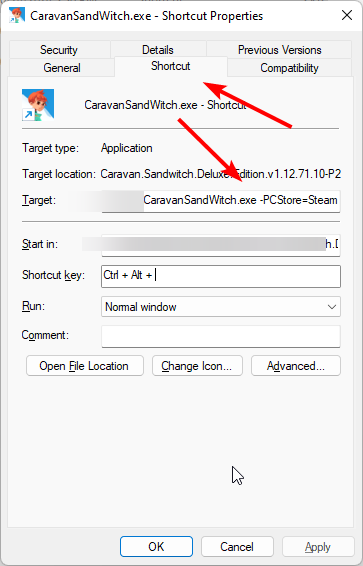
Save and enjoy ;)Graphic : RTX 4060TI Ventus Black x2 8GB
Ram : 16GB
Processor : Ryzen 5 4600G Vega 7 Gaming Test
Rendu : 4K 2160p60
And no download I guess. Moving on.